
* 개념 복습과 학습 정도를 파악하고자 포스팅합니다!
* Claude, ChatGPT를 활용하여 이미지를 생성하고 활용합니다.
스트림 API
1. 스트림?
스트림은 데이터의 흐름입니다.
컬렉션이나 배열의 데이터를 선언형으로 처리하는 파이프라인을 만들어주죠.
반복문 없이 무엇을 할지만 적으면 됩니다!
// 기존 방식 — 어떻게 처리할지 명시
List<String> result = new ArrayList<>();
for (String name : names) {
    if (name.startsWith("A")) {
        result.add(name.toUpperCase());
    }
}
Collections.sort(result);

// 스트림 방식 — 무엇을 할지만 선언
List<String> result = names.stream()
    .filter(name -> name.startsWith("A"))
    .map(String::toUpperCase)
    .sorted()
    .collect(Collectors.toList());
2. 스트림 파이프라인 구조
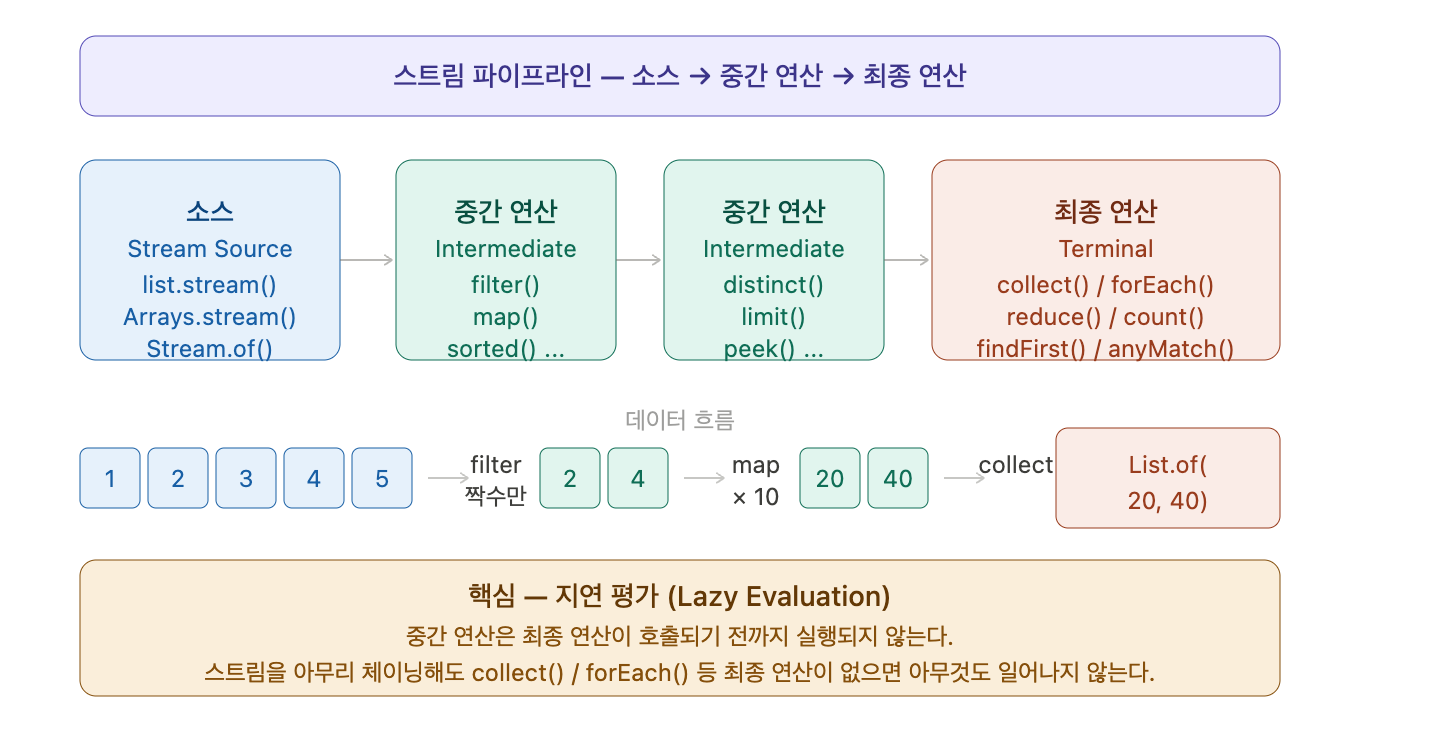
3. 스트림 생성 방법
// 컬렉션으로부터
Stream<String> s1 = list.stream();
Stream<String> s2 = list.parallelStream();

// 배열로부터
int[] arr = {1, 2, 3, 4, 5};
IntStream s3 = Arrays.stream(arr);
Stream<String> s4 = Arrays.stream(new String[]{"X", "Y"});

// 직접 생성
Stream<String> s5 = Stream.of("A", "B", "C");
Stream<Integer> s6 = Stream.iterate(0, n -> n + 2); // 0, 2, 4, 6, ... 무한
Stream<Double> s7 = Stream.generate(Math::random); // 무한 스트림
Stream<String> s8 = Stream.empty(); // 빈 스트림

// 기본형 특화 스트림 (오토박싱 비용 없음)
IntStream is = IntStream.range(1, 6);         // 1, 2, 3, 4, 5
LongStream ls = LongStream.rangeClosed(1, 5); // 1, 2, 3, 4, 5
DoubleStream ds = DoubleStream.of(1.1, 2.2);
4. 중간 연산 (Intermediate Operations)
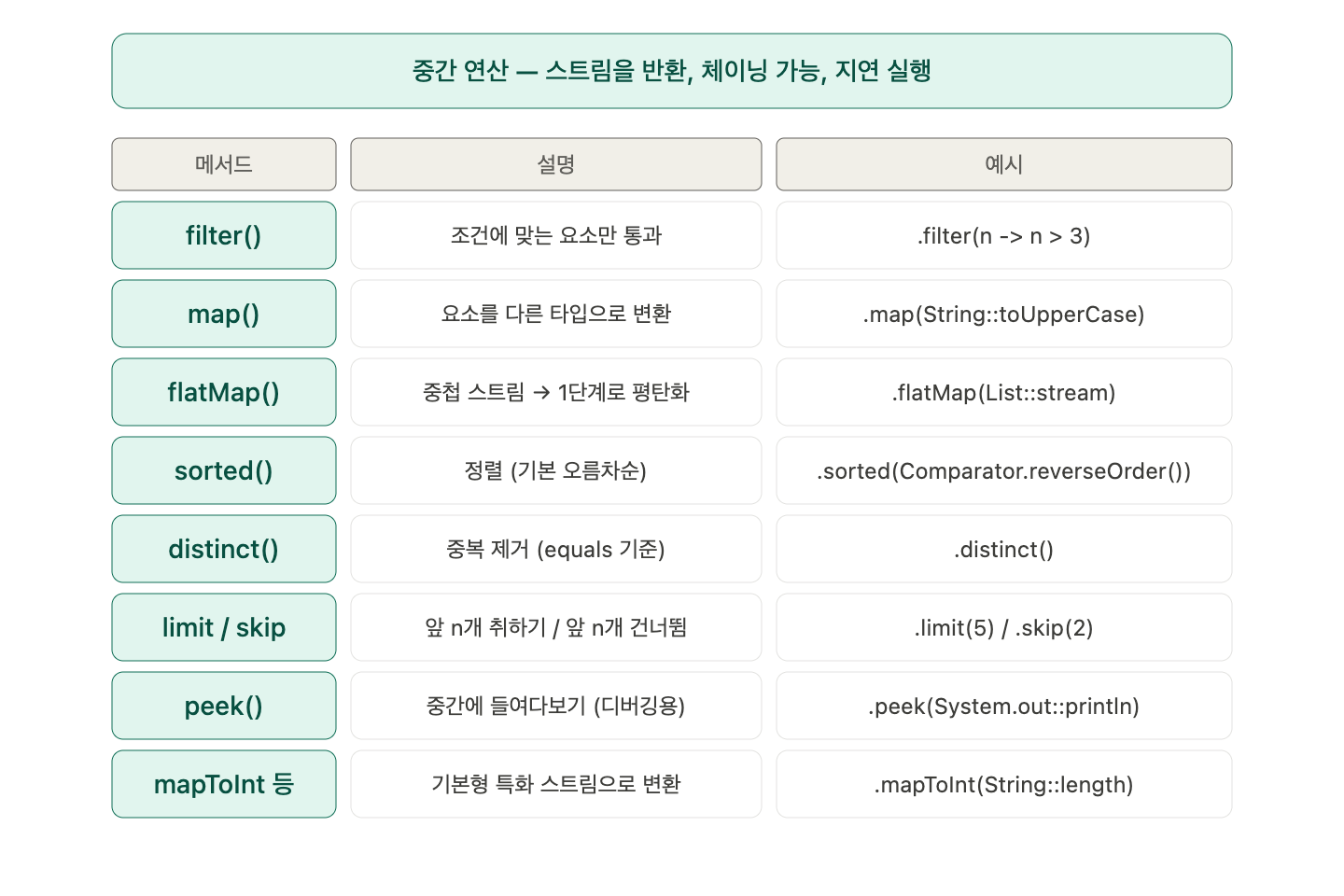
map(List::stream)을 사용하면 중첩 스트림이 생겨서 값을 활용하는데 불편함이 생깁니다.
flatMap(List::stream)을 사용하면 스트림을 평탄화 시켜서 값을 활용할 때 편해져요!
List<List<Integer>> nested = List.of(
    List.of(1, 2, 3),
    List.of(4, 5),
    List.of(6, 7, 8, 9)
);

List<Integer> flat = nested.stream()
    .flatMap(List::stream)   // [[1,2,3],[4,5],...] → [1,2,3,4,5,...]
    .collect(Collectors.toList());
// [1, 2, 3, 4, 5, 6, 7, 8, 9]

// 문장에서 단어 추출
List<String> sentences = List.of("Hello World", "Java Stream");
List<String> words = sentences.stream()
    .flatMap(s -> Arrays.stream(s.split(" ")))
    .collect(Collectors.toList());
// ["Hello", "World", "Java", "Stream"]
5. 최종 연산 (Terminal Operations)
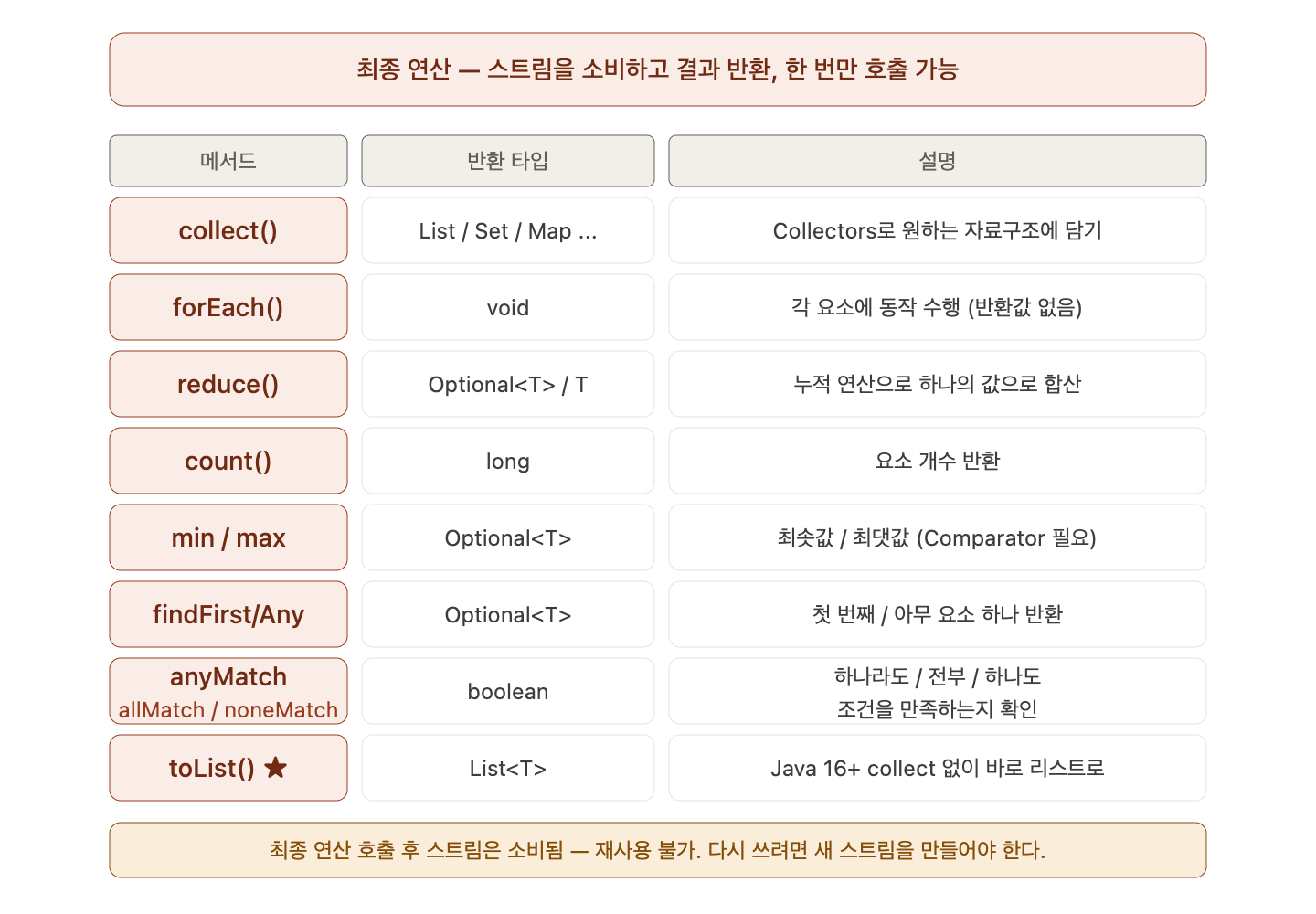
Collectors
List<String> names = List.of("Alice", "Bob", "Charlie", "Alice", "David");

// 리스트로
List<String> toList = names.stream()
    .collect(Collectors.toList());

// Set으로 (중복 제거)
Set<String> toSet = names.stream()
    .collect(Collectors.toSet());

// 문자열 합치기
String joined = names.stream()
    .collect(Collectors.joining(", ", "[", "]"));
// "[Alice, Bob, Charlie, Alice, David]"

// 그룹핑 — Map<길이, List<이름>>
Map<Integer, List<String>> byLength = names.stream()
    .collect(Collectors.groupingBy(String::length));
// {3=[Bob], 5=[Alice, Alice, David], 7=[Charlie]}

// 파티셔닝 — 조건에 따라 true/false 두 그룹으로
Map<Boolean, List<String>> partitioned = names.stream()
    .collect(Collectors.partitioningBy(s -> s.length() > 4));
// {false=[Bob], true=[Alice, Charlie, Alice, David]}

// 통계
IntSummaryStatistics stats = names.stream()
    .collect(Collectors.summarizingInt(String::length));
// count=5, sum=23, min=3, max=7, average=4.6

// Map으로 변환
Map<String, Integer> nameToLen = names.stream()
    .distinct()
    .collect(Collectors.toMap(s -> s, String::length));
// {Alice=5, Bob=3, Charlie=7, David=5}
reduce
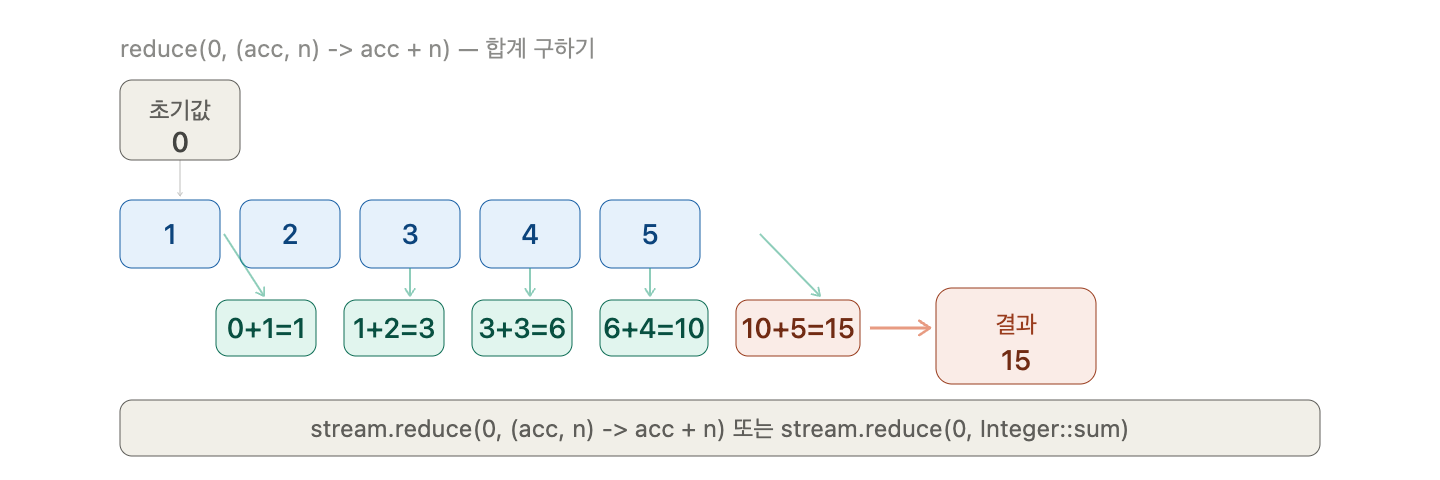
6. 예제
학생 데이터를 사용하여 여러 값 추출하기
// 학생 데이터
record Student(String name, int score, String dept) {}

List<Student> students = List.of(
    new Student("Alice", 92, "CS"),
    new Student("Bob", 78, "Math"),
    new Student("Charlie", 85, "CS"),
    new Student("David", 91, "Math"),
    new Student("Eve", 67, "CS")
);

// ① CS 학과 평균 점수
double csAvg = students.stream()
    .filter(s -> s.dept().equals("CS"))
    .mapToInt(Student::score)
    .average()
    .orElse(0);
// (92 + 85 + 67) / 3 = 81.33

// ② 점수 상위 3명 이름 (내림차순)
List<String> top3 = students.stream()
    .sorted(Comparator.comparingInt(Student::score).reversed())
    .limit(3)
    .map(Student::name)
    .collect(Collectors.toList());
// [Alice, David, Charlie]

// ③ 학과별 평균 점수
Map<String, Double> avgByDept = students.stream()
    .collect(Collectors.groupingBy(
        Student::dept,
        Collectors.averagingInt(Student::score)
    ));
// {CS=81.33, Math=84.5}

// ④ 합격(80점 이상) / 불합격 분류
Map<Boolean, List<String>> result = students.stream()
    .collect(Collectors.partitioningBy(
        s -> s.score() >= 80,
        Collectors.mapping(Student::name, Collectors.toList())
    ));
// {true=[Alice, Charlie, David], false=[Bob, Eve]}

// ⑤ 전체 점수 합계
int total = students.stream()
    .mapToInt(Student::score)
    .sum();
// 413
핵심 정리

스트림의 핵심은 데이터를 어떻게 처리할지가 아니라 무엇을 원하는지만 선언하는 것입니다.
filter, map, collect 패턴만 제대로 사용할 줄 알아도 되게 언어에 대한 이해도가 확실히 보일 것 같습니다!
'Language > Java' 카테고리의 다른 글
| [Java] Enum 파헤치기 (0) | 2026.04.25 |
|---|---|
| [Java] 람다 표현식과 함수형 인터페이스 파헤치기 (0) | 2026.04.23 |
| [Java] 제네릭(Generic) 완전히 파헤치기 (0) | 2026.04.23 |
| [Java] 컬렉션 프레임워크 (0) | 2026.04.23 |
| [Java] 예외 처리 (Exception Handling) (0) | 2026.04.23 |