
* 개념 복습과 학습 정도를 파악하고자 포스팅합니다
예외(Exception)
1. 예외란 무엇인가
프로그램 실행 중 발생할 수 있는 예기치 않은 상황을 의미합니다.
예외가 발생하면 프로그램이 비정상적으로 종료될 수 있으므로, 이를 적절히 처리하여 프로그램의 안정성을 높여야 합니다.
예외가 발생할 수 있는 대표적인 상황
1. 존재하지 않는 파일을 열려고 할 때
2. 0으로 나누기를 시도했을 때
3. 배열의 범위를 벗어난 인덱스에 접근할 때
4. null 객체의 메소드를 호출할 때
2. 예외 계층 구조
Java의 모든 예외는 Throwable클래스를 상속받으며, 크게 Error와 Exception으로 나뉩니다.
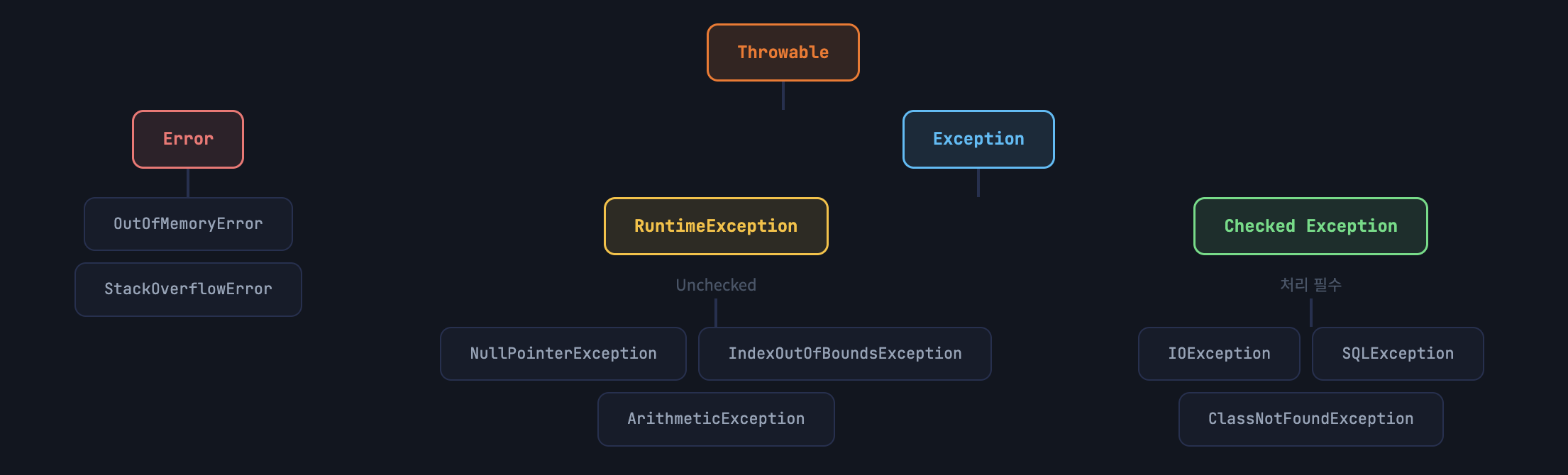
Error는 시스템 레벨의 심각한 오류로 복구가 불가능합니다. 반면 Exception은 프로그램에서 처리할 수 있는 오류입니다.
3. try-catch-finally 구문
예외를 처리하는 가장 기본적인 방법입니다.
try 블록에서 예외가 발생하면 catch 블록이 실행되고, finally 블록은 예외 발생여부와 관계없이 항상 실행됩니다.
public class ExceptionBasic {
    public static void main(String[] args) {
        // 기본 try-catch 예제
        try {
            int result = 10 / 0;  // ArithmeticException 발생!
            System.out.println("결과: " + result);
        } catch (ArithmeticException e) {
            System.out.println("오류: 0으로 나눌 수 없습니다!");
            System.out.println("메시지: " + e.getMessage());
        }

        System.out.println("프로그램 계속 실행됩니다.");
    }
}
실행결과
오류: 0으로 나눌 수 없습니다!
메시지: / by zero
프로그램 계속 실행됩니다.
4. 다중 catch 블록
하나의 try 블록에서 여러 종류의 예외가 발생할 수 있을 때, 각각의 예외를 다르게 처리할 수 있습니다.
public class MultiCatchExample {
    public static void main(String[] args) {
        String[] names = {"김철수", "이영희", "박민수"};

        try {
            // 배열 인덱스 초과
            System.out.println(names[5]);

            // null 참조
            String text = null;
            System.out.println(text.length());

        } catch (ArrayIndexOutOfBoundsException e) {
            System.out.println("배열 범위 오류: " + e.getMessage());

        } catch (NullPointerException e) {
            System.out.println("null 참조 오류: " + e.getMessage());

        } catch (Exception e) {
            // 가장 상위 예외는 마지막에!
            System.out.println("알 수 없는 오류: " + e.getMessage());
        }
    }
}
catch 블록의 순서가 중요합니다!
구체적인 예외를 먼저 처리하고, 상위 예외 클래스(Exception)는 마지막에 위치해야 합니다.
순서를 잘못 배치하면 컴파일 에러가 발생해요.
5. Multi-catch
Java 7 부터는 파이프( | ) 기호를 사용해서 여러 예외를 한 번에 처리할 수 있습니다.
public class MultiCatchJava7 {
    public static void main(String[] args) {
        try {
            int[] numbers = {1, 2, 3};
            System.out.println(numbers[10]);

        } catch (ArrayIndexOutOfBoundsException | NullPointerException e) {
            // 파이프(|)로 여러 예외를 한 번에 처리
            System.out.println("배열 또는 null 관련 오류: " + e.getMessage());
        }
    }
}
6. finally 블록
예외 발생이 없을 때
- RUN: try 블록 실행
- SKIP: catch 블록 건너뜀
- ALWAYS: finally 블록 실행
예외 발생했을 때
- RUN: try 블록 실행 중 예외 발생
- CATCH: catch 블록 실행
- ALWAYS: finally 블록 실행
import java.io.*;

public class FinallyExample {
    public static void main(String[] args) {
        FileReader reader = null;

        try {
            reader = new FileReader("data.txt");
            int data = reader.read();
            System.out.println("데이터: " + (char)data);

        } catch (FileNotFoundException e) {
            System.out.println("파일을 찾을 수 없습니다");

        } catch (IOException e) {
            System.out.println("파일 읽기 오류");

        } finally {
            // 리소스 정리는 항상 finally에서!
            if (reader != null) {
                try {
                    reader.close();
                    System.out.println("파일을 닫았습니다.");
                } catch (IOException e) {
                    System.out.println("파일 닫기 실패");
                }
            }
        }
    }
}
7. throws 키워드
메소드에서 발생할 수 있는 예외를 호출자에게 전달하는 키워드입니다.
메소드 시그니처에 선언하여 "이 메소드는 이런 예외를 던질 수 있다"고 명시합니다.
Flow
- 메소드 A 호출: 호출자가 메소드 A를 실행합니다.
- 메소드 A에서 예외 발생: 메소드 A에서 IOException이 발생하고, throws로 선언되어 있습니다.
- 호출자에게 예외 전달: 메소드 A는 예외를 처리하지 않고 호출자에게 전달합니다.
- 호출자가 try-catch로 처리: 호출자는 try-catch 블록으로 예외를 처리합니다.
import java.io.*;

public class ThrowsExample {

    // 예외를 던지는 메소드 (처리 책임을 호출자에게)
    public static void readFile(String fileName) throws IOException {
        FileReader reader = new FileReader(fileName);
        BufferedReader br = new BufferedReader(reader);

        String line = br.readLine();
        System.out.println(line);

        br.close();
        // IOException 처리 안함 → 호출자에게 전달
    }

    public static void main(String[] args) {
        try {
            // throws 선언된 메소드는 반드시 try-catch 또는 throws 필요
            readFile("test.txt");

        } catch (IOException e) {
            System.out.println("파일 읽기 실패: " + e.getMessage());
        }
    }
}
8. throw vs throws
throw
예외를 직접 발생시킬 때 사용합니다.
메소드 내부에서 사용하며, 한 번에 하나의 예외만 던질 수 있습니다.
ex) throw new Exception();
throws
예외를 메소드 밖으로 던짐을 선언할 때 사용합니다.
메소드 시그니처에서 사용하며, 여러 예외를 선언할 수 있습니다.
ex) void method() throws Exception
public class ThrowVsThrows {

    // throws: 메소드 선언부에 사용
    public static void method1() throws Exception {
        // throw: 예외를 직접 발생
        throw new Exception("의도적으로 예외 발생");
    }

    public static void validateAge(int age) throws IllegalArgumentException {
        if (age < 0) {
            throw new IllegalArgumentException("나이는 0보다 커야 합니다");
        }
    }
}
9. 커스텀 예외 (Custom Exception)
Java의 기본 예외만으로는 비즈니스 로직의 모든 예외 상황을 표현하기 어렵습니다.
커스텀 예외를 만들어서 더 명확하고 의미있는 예외 처리가 가능해요!
제가 생각했을 때 커스텀 예외를 작성할 때는 아래 수칙이 지켜지면 좋을 것 같습니다.
- Exception 또는 RuntimeException 상속
- 클래스 이름은 ~Exception으로 끝내기!
- 기본 생성자와 메시지를 받는 생성자 제공
- 필요시 원인 예외(cause)를 받는 생성자 추가하기
// Exception을 상속 → Checked Exception
public class InsufficientBalanceException extends Exception {

    private int balance;
    private int amount;

    // 기본 생성자
    public InsufficientBalanceException() {
        super("잔액이 부족합니다");
    }

    // 메시지를 받는 생성자
    public InsufficientBalanceException(String message) {
        super(message);
    }

    // 상세 정보를 포함하는 생성자
    public InsufficientBalanceException(int balance, int amount) {
        super("잔액 부족: 현재 " + balance + "원, 필요 " + amount + "원");
        this.balance = balance;
        this.amount = amount;
    }

    // 원인 예외를 포함하는 생성자
    public InsufficientBalanceException(String message, Throwable cause) {
        super(message, cause);
    }

    public int getBalance() { return balance; }
    public int getAmount() { return amount; }
}
public class BankAccount {
private String accountNumber;
private int balance;
public BankAccount(String accountNumber, int initialBalance) {
this.accountNumber = accountNumber;
this.balance = initialBalance;
}
// 출금 메소드 - Checked Exception 사용
public void withdraw(int amount) throws InsufficientBalanceException {
if (amount > balance) {
throw new InsufficientBalanceException(balance, amount);
}
balance -= amount;
System.out.println(amount + "원 출금 완료. 잔액: " + balance + "원");
}
// 입금 메소드 - Unchecked Exception 사용
public void deposit(int amount) {
if (amount <= 0) {
throw new IllegalArgumentException("입금액은 0보다 커야 합니다");
}
balance += amount;
System.out.println(amount + "원 입금 완료. 잔액: " + balance + "원");
}
public int getBalance() { return balance; }
}
public class BankMain {
public static void main(String[] args) {
BankAccount account = new BankAccount("1234-5678", 10000);
try {
account.deposit(5000);
account.withdraw(3000);
account.withdraw(20000); // 예외 발생!
} catch (InsufficientBalanceException e) {
System.out.println("[오류] " + e.getMessage());
System.out.println("부족한 금액: " + (e.getAmount() - e.getBalance()) + "원");
}
System.out.println("\n최종 잔액: " + account.getBalance() + "원");
}
}실행결과
5000원 입금 완료. 잔액: 15000원
3000원 출금 완료. 잔액: 12000원
[오류] 잔액 부족: 현재 12000원, 필요 20000원
부족한 금액: 8000원
최종 잔액: 12000원
'Language > Java' 카테고리의 다른 글
| [Java] 제네릭(Generic) 완전히 파헤치기 (0) | 2026.04.23 |
|---|---|
| [Java] 컬렉션 프레임워크 (0) | 2026.04.23 |
| [Java] String 파헤치기 (0) | 2026.04.23 |
| [Java]내부 클래스 정리 (0) | 2026.04.22 |
| [Java] 배열에 대해서 (0) | 2026.04.22 |